
What to Know About Exact Match | Search Scientists

Exact Match Keywords in Google Ads: Complete Guide (2026)

In the next few days of AdWords Help, we’ll be exploring keywords, as we begin to build our first campaign. Specifically, we’ll be covering positive keyword match types, and their best practices.

If you haven’t learned what a match type is, be sure to check out the post “Keywords vs Search Query

For now, let’s jump into our first match type: Exact Match

What is Exact Match?

Just like it sounds, Exact Match is the best way to get your keywords to exactly match up with the search queries that people search for. For example, when we bid on Exact Match ‘dog training’, we will only appear for ‘dog training’. If you read our post on broad match keywords, you may have become very fearful of all the synonyms, and stems of those synonyms, when exploring match types (since you risk showing up for irrelevant terms with most match types).

Thankfully, Exact Match is your knight in shining armor – ready to save you from irrelevant queries from triggering your ads and wasting money.

Under classic Exact Match rules:

  • when you bid on a keyword ‘dog training,’ you should only appear for a search query ‘dog training’
  • when you bid on a keyword ‘boats for sale,’ you should only appear for a search query ‘boats for sale’

How to Select Exact Match

When you’re inside your AdWords account, you will see some keywords are wrapped in brackets:

  • [dog training]
  • [boats for sale]

This indicates an Exact Match keyword. If you are using the AdWords web interface to add keywords, you’ll want to wrap all your keywords in brackets manually. To save time, you can use a keyword wrapper. This is my favorite.

For more advanced users, you will want to have two columns in your excel file upload. Keyword & Keyword Match Type.
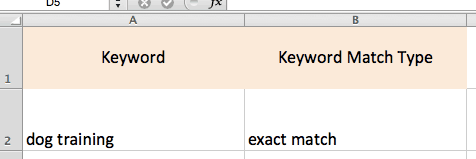

uploading exact match keywords in excel
If you are using AdWords editor to upload keywords, use these two columns.
Comparison

Exact vs. Phrase vs. Broad Match

Choose the right match type for every keyword in your campaign

Match Type Triggers Ads For Won't Show For Best For
Exact Match [dog training]
● High Control
  • "dog training"
  • "dog trainer" (close variant)
  • "dog trainning" (misspelling)
  • "dog trainers" (plural)
  • "dog training classes near me"
  • "how to train a dog"
  • "best dog training tips"
High-intent keywords
Max budget control
Proven converters
Phrase Match "dog training"
● Medium Control
  • "dog training tips"
  • "best dog training methods"
  • "affordable dog training NYC"
  • "online dog training courses"
  • "training my puppy at home"
  • "teach dog tricks YouTube"
  • "pet behavior specialist"
Balanced reach
Mid-funnel traffic
New query discovery
Broad Match dog training
● Low Control
  • "puppy obedience school"
  • "pet behavior tips"
  • "how to stop dog barking"
  • "dog trainer salary" ⚠️
  • Almost nothing is excluded without negatives
Top-of-funnel
Smart Bidding only
Keyword research
💡 Pro tip: Run all three match types in separate ad groups and use negatives to prevent cannibalisation. Promote top-converting search terms from broad/phrase into exact match once they have 20+ clicks and a proven CPA.

When You Should Use Exact Match

You should use Exact Match keywords to make up the bulk of your AdWords account. The rationale is simple: you have the most control, it saves money, and puts the focus on keywords that you are planning for.

  • Control: Exact Match keywords will only trigger their exactly matching search query – no surprises, no shocks with irrelevant spending
  • Data is transparent: With other match types, you need to access separate reports to find out the queries that trigger your ads. With Exact Match, you know exactly what is triggering your account

Aim to have an account with 50-70% Exact Match Keywords. A healthy account is constantly looking to add as many profitable exact match keywords as possible.

Why you don’t want 100% exact match keywords.

As mentioned in our previous day of AdWords Help, you simply can’t predict all the searches that people will make. Someone may search ‘dog training’ or ‘dog training + zip code’ or ‘training dogs + zip code + state’ . In fact, almost 25% of searches are completely new to google every month. Meaning if you had an account with 100% exact match, you’d be missing out on 25% of searches every month.

For the rest of your account, you can focus on discovery keywords, like phrase, broad, and modified broad match keywords. We’ll talk more about the other match types in future days of AdWords Help.

Modern Exact Match: Variants Included

Classically, Exact Match meant exact. Meaning if you bid on [new shoes], you would not appear for the search query [new shoe].

In 2014, Google decided that advertisers should be appearing for variants. What this means is that Exact Match now includes close variants and misspellings.

Keep this in mind when you set up your ad groups.  If you are bidding on [baby clothes], and a search comes through for ‘baby cloths’, it may trigger your ad, as a misspelling variant.  You’ll want to balance all of your match types with negative keywords, regardless of match type. More on Negative Keywords in the days to come.

Exact Match: Final Word

Compared to other match types (broad, modified broad, and phrase), Exact Match provides the most control with the smallest risk of showing up for an irrelevant search.

When you setup your campaigns, you want at least half of your keywords to be Exact Match. Balancing the rest of your account with discovery keywords (to be discussed in future days of AdWords help), allows you ensure that you have a solid foundation of control, and are capturing all the various ways different people may search for your business.

This post is part of a series: ‘100 Days of AdWords Help’.

FAQ

Frequently Asked Questions

Everything you need to know about Exact Match in Google Ads

Exact match keywords are wrapped in square brackets — for example: [dog training], [buy running shoes], [plumber near me].

In Google Ads Editor or CSV uploads, set the Match Type column to Exact — the brackets are applied automatically.

Not exactly. Since 2019, Google includes close variants: misspellings, singular/plural forms, abbreviations, and paraphrases with the same meaning.

Your ad will NOT show for queries that add extra words before or after your keyword — that remains the key difference from phrase match.

Aim for 50–70% of your keywords to be exact match. The rest should be phrase or broad match (with Smart Bidding) to capture new search queries.

A 100% exact match campaign misses approximately 25% of monthly search volume — queries Google has never seen before.

No — Google does not allow opting out. The best way to control unwanted traffic is:

  • Review your Search Terms report weekly
  • Add irrelevant queries as negative exact match keywords
  • Build a shared negative keyword list for terms that are never relevant

Exact match ([keyword]) only triggers for the keyword itself and close variants — no extra words allowed in the query.

Phrase match ("keyword") triggers for queries that contain your keyword as part of a longer search — for example, "best dog training tips near me" would match "dog training".

Share this post

Picture of Michael Erickson

Michael Erickson

Emailing my clients and telling them I helped increase their return on ad spend by 300% never gets old. I love rising above the technical jargon and providing your business with online marketing momentum to reach new heights. Enthusiast for all things science, surfing, and Search Scientists.

2 thoughts on “Exact Match Keywords in Google Ads: Complete Guide (2026)”

Leave a Comment

Your email address will not be published. Required fields are marked *

Scroll to Top